Connect with us

Tech & Innovation

3 Tech tips to thrive in a remote work future

When it comes to making tech investments for long-term remote work, it is important to get it right from day one. Here are three tips that organizations must make in order to thrive in a remote work environment. 

Published

on

Whether for better or for worse, remote work is here to stay. As countries grapple with uneven vaccination rates and new coronavirus variants, the COVID-19 battle rages on. Even as organizations in the Asia Pacific and Japan (APJ) region swing between working from home and returning to the office, one thing is for certain – the way we work has changed forever. Hybrid work is our new reality!

It’s no secret that technology is the underlying enabler of a successful and sustainable remote work strategy. The good news is that at least 50% of employees in APJ feel that their employers are doing everything they can to provide them with the necessary technology resources to work remotely, according to Dell Technologies’ Remote Work Readiness Index. The not-so-great news is that employees continue to face tech challenges when working remotely, alongside the temptations of enjoying free online car games – the top three being unstable remote networks; limited access to internal company resources; as well as using personal productivity tools for work, which can pose a threat to cybersecurity.

“Business leaders and managers who fail to see remote work as the future require a mindset shift. In the early days of the global pandemic, many organizations were focused on helping employees make a smooth transition to working from home to minimize business disruption. Back then, employers were looking for immediate fixes such as purchasing video conferencing and collaboration software or tweaking basic policies in favour of flexible work,” said Jean-Guillaume Pons, Senior Vice President & General Manager, Asia Pacific, Japan and Greater China, Client Solutions Group, Dell Technologies. “Today, however, this “band-aid mentality” needs to change, and employers must approach remote work with a long-term strategy in mind.” 

When it comes to making tech investments for long-term remote work, it is important to get it right from day one. Here are three tips that organizations must make in order to thrive in a remote work environment. 

Tip #1: Help employees do their job better by providing the right productivity tools

Supporting employees with the right technology and tools is a critical first step. The Remote Work Readiness Index study found that among the 7,192 respondents across seven markets in APJ, 39% named company-issued productivity equipment and tools as the top tech resource that employers must provide for long-term remote work. 

There are two key implications that could arise if employees do not have access to company-issued productivity tools they need. Firstly, this may result in reduced productivity and increased frustration among staff who feel that they are not set up for success in their remote work environment. In the long term, this could take a toll on team morale, retention rates and business performance.

A second and more serious implication is that without the right productivity equipment, employees may resort to downloading company documents onto their own personal devices to perform their daily tasks more efficiently. This leads to exposed data and the “double handling” or duplication of data across multiple platforms. For organizations, this poses a challenge in tracking, managing, and protecting sensitive data stored at endpoints or employee devices.

Business leaders must prioritize the employee experience in a hybrid work model, by investing in quality tech resources – from laptops and monitors to peripheral accessories – to empower staff to work productively and securely. 

Tip #2: Set up your organization with advanced IT infrastructure for hybrid working

A long-term hybrid work model is one that is designed to be a ‘ready-for-anything’ digital workplace. This means that regardless of whether employees are working from home or in the office, organizations should be ready to enable seamless collaboration and manage IT resources from anywhere. 

One key investment that can help achieve this is cloud computing technology. With the rise of the hybrid workplace, the adoption of cloud technologies has been increasing – Gartner predicts that worldwide end-user spending on public cloud services will grow 26.7% in 2021, as CIOs and IT leaders continue to prioritize cloud-delivered applications such as software as a service (SaaS).

As a start, organizations making the shift to the cloud can consider starting with a hybrid cloud infrastructure model – one that combines public, private and edge clouds to support workloads from traditional and next-generation applications. 

Learning from its own experience of enabling flexible remote work for team members worldwide, Dell Technologies built a multi-cloud environment and put in place other virtualization initiatives, allowing its cloud infrastructure to run what team members are accessing remotely at a faster rate and without having to increase the number of IT staff. Solutions like Dell Technologies’ Unified Workspace also allowed IT teams to deploy, secure, manage and support company-owned devices from the cloud. 

Tip #3: Protect your organization’s data with endpoint security solutions

A non-negotiable must-have in an organization’s hybrid work model is a robust security and data protection strategy. As remote work causes data to be distributed across multiple locations such as data centres, various work sites and hybrid and multi-cloud environments, a comprehensive data protection strategy – combining proven and modern data protection – is essential.

The Dell Technologies’ Remote Work Readiness Index found that in APJ, nearly 1 in 3 (28%) of employees had to contend with using personal productivity equipment or tools for work. This gives rise to a large volume of confidential data stored on personal devices, or endpoints. To securely manage the enormous amount of data being generated at the edge, organisations need to prevent, detect and respond to threats wherever they occur. 

A new global commissioned study by Dell Technologies and Forrester Consulting showed that 55% of businesses in APJ have had to put emergency steps in place to keep data safe outside of their company network as people continue to work remotely. But rather than take a reactive response, it is recommended to invest in cybersecurity infrastructure that is flexible, scalable and manageable, and ensuring the proactive prevention of security threats and data loss through AI, machine learning and easy-to-implement behavioural endpoint detection.

Embracing a connected workplace

With the right tech investments in place, organizations will be well-placed to pivot seamlessly between working from home and the office with minimal disruption to business operations. Dell Technologies has a Connected Workplace program which was initially created to help provide a flexible working environment for our team members across the world. From its decade-long experiences with flexible work, Dell was able to quickly enable 90% of its team members globally to work remotely in just one weekend – during the early days of the pandemic in March 2020.

Organizations must also remember that business success today is not just about providing the right technology. It is equally – if not more – important to invest in digital upskilling and the wellbeing of employees as they cope with other challenges of working from home, like blurred boundaries between professional and personal lives. The success of a connected workplace ultimately depends on an organization’s ability to embrace a flexible culture and support with the right technology infrastructure, to enable innovation and effective remote working.

Tech & Innovation

Epson launches SureColor-S7130 as latest addition to acclaimed SC S-Series of eco-solvent printers

With the equipment segment expected to capture more than 75% of the market revenue in Asia Pacific’s commercial printing market, where there’s also a growing demand for short-run and on-demand printing, the SC-S7130 aims to meet evolving needs by empowering businesses to operate more competitively and sustainably.
Published

on

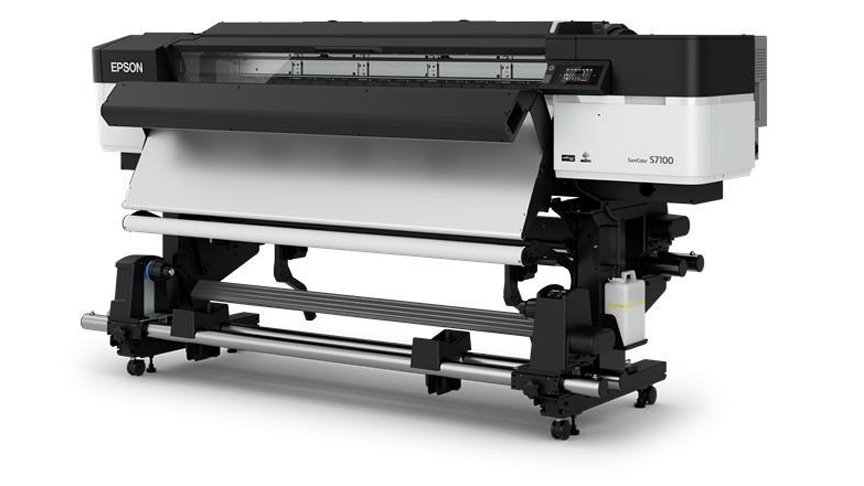
Epson launched the SureColor-S7130 (SC-S7130), the latest addition to its acclaimed SC S-Series of eco-solvent printers. Designed for print service providers specializing in small-volume production, the SC-S7130 combines enhanced productivity, reliability and print quality in a cost effective solution, making it a significant upgrade from its predecessor, the SC-S40670.

With the equipment segment expected to capture more than 75% of the market revenue in Asia Pacific’s commercial printing market, where there’s also a growing demand for short-run and on-demand printing, the SC-S7130 aims to meet evolving needs by empowering businesses to operate more competitively and sustainably.

Engineered for Productivity and Performance

The SC-S7130 features an upgraded PrecisionCore Micro TFP Printhead, delivering close to a 24% increase in print speed in default mode[1]. Equipped with 3,200 nozzles and a wider printhead than its predecessor, the SC-S7130 achieves expanded print width in one pass—improving throughput across all print modes.

To minimize graininess and banding, the nozzles on the SC-S7130 have been specially redesigned to release smaller M-sized dot and larger L-sized dot for high quality print.

Ease of use is a hallmark of the SC-S7130, which features a 4.3-inch touch display for intuitive operation even when wearing gloves. The SC-S7130 also comes with Epson Edge Print Pro, the latest edition of Epson’s advanced image processing and production software that enhances user convenience and remote management during operations. Further, a new ‘Text Sharpness’ mode in Epson Edge Print Pro enables precise and crisp text printing with the SC-S7130.

Printing made Ultra-Reliable

In addition to a newly designed printhead guard that flattens jammed media to prevent damage to the printhead, the carriage temperature sensor is now mounted closer to the nozzle surface for a more accurate reading. The sensor also detects temperature changes quickly, maintaining consistent color reproduction across jobs.

Equipped with a new Nozzle Verification Technology that monitors nozzle performance in real-time, the SC-S7130 is capable of automatically detecting clogged nozzles and triggering an alert so that businesses can act quickly, ensuring print quality is not compromised across jobs.

The SC-S7130 uses Epson UltraChromeTM GS3 inks in 800ml ink packs, replacing the 700ml ink cartridge found in its predecessor, thereby reducing waste and the frequency of ink replacements. Furthermore, the Epson UltraChromeTM GS3 ink technology is GREENGUARD Gold certified for low chemical emissions and volatile organic compounds, making it safe for long-term indoor use.

A Holistic Solution for Diverse Printing Needs

In addition to delivering exceptional performance and enhanced productivity, the SC-S7130 also integrates seamlessly with Epson Cloud Solution PORT, providing businesses with a holistic solution for managing their printing needs. This intuitive, cloud-based remote monitoring software offers real-time insights into printer fleet performance, usage and efficiency, empowering print service providers to make data-driven decisions.

With Epson Cloud Solution PORT, businesses can also seamlessly integrate large printer fleets, monitor printer status, track ink consumption and access operation history remotely, to ensure optimal performance at all times.

“The SC-S7130 is engineered for a wide range of applications, including outdoor and indoor signage, banners and more. Its versatility and reliability, coupled with its cost-effective ownership, make this printer a valuable addition to any print service provider’s lineup,” said Noelle Gonzalez, Head of Marketing and Customer Service at Epson Philippines Corporation. “The SC-S7130 is a testament to Epson’s dedication to creating innovative solutions that empower businesses to remain competitive while meeting their unique needs.”

[1] Printing speed increased 23.8% in default mode using adhesive vinyl in 600 x 1200dpi, 6-pass.

Continue Reading

Tech & Innovation

Acer launches TravelMate X14 AI business laptop to empower SMBs and hybrid workforces

The lineup includes the Acer TravelMate X14 AI Copilot+ PC and three new additions to the eco-friendly Vero projector series: the Acer Vero XL2320p, Vero XL2521, and Vero SL2520n.

Published

on

Acer announced a suite of commercial products designed to empower the modern workforce. The lineup includes the Acer TravelMate X14 AI Copilot+ PC and three new additions to the eco-friendly Vero projector series: the Acer Vero XL2320p, Vero XL2521, and Vero SL2520n.

“As AI is becoming increasingly important in modern business workflows, small and medium businesses need devices that integrate intelligent tools, robust security, and mobility,” said James Lin, General Manager, Notebooks, Acer Inc. “The TravelMate X 14 AI was designed to deliver just that, powered by the latest Intel Core Ultra processors and Copilot+ PC experiences, offering professionals a lightweight yet durable solution crafted to accelerate productivity and collaboration from anywhere.”

“The Acer TravelMate X14 AI demonstrates what’s possible when advanced hardware and modern processors come together. With powerful performance, enhanced security, and unique AI experiences, it’s an ideal choice for today’s professionals looking to upgrade to a PC that prioritizes portability and performance. Together with Acer, we’re redefining what the modern workforce can expect from their Windows 11 PCs.” — Mark Linton, Vice President, Windows + Devices, Microsoft

TravelMate X4 14 AI: Lightweight, Secure, and AI-Ready to Boost SMBs

Built for small and medium businesses (SMBs) and mobile professionals, the TravelMate X4 14 AI (TMX414-51) is a sleek and secure AI business laptop. It features up to an Intel Core Ultra 7 Processor 258V with 115 TOPS[1] of overall performance, up to 32 GB LPDDR5X memory, and up to 1 TB PCIe storage, ensuring smooth multitasking. Running Windows 11 Pro, the laptop supports Copilot+ PC experiences[2], including Recall (preview), Click to Do, improved Windows search, Cocreator in Microsoft Paint, and Live Captions for real-time multilingual translations.

Weighing just 1.27 kg (2.8 lbs) and measuring 15.9 mm (0.63 inches) thin, it is ideal for professionals who travel frequently and work remotely. Built to meet MIL-STD 810H durability standards, it can withstand vibrations, humidity, and extreme temperatures, making it a reliable travel companion. Coupled with its stylish design, the portable AI business laptop can certainly make an impression within any work setup or business meeting.

The 14-inch 16:10 WUXGA display provides ample screen space, with an optional OLED panel with 500 nits peak brightness delivering vibrant colors with TÜV Rheinland Low Blue Light certification[3] (hardware solution) to support better eye comfort. Acer PurifiedView 2.0 and Acer PurifiedVoice 2.0 technology, paired with DTS:X Ultra Audio-enhanced speakers, ensure crystal-clear video calls.

This business laptop complies with TCO certification[4] and includes security features to help protect data and on-screen information. Acer UserSensing 2.0 enables the built-in proximity sensor to dim and then lock the screen when the user is away. Lightning-fast Wi-Fi 7 and Bluetooth 5.4 keep professionals connected for seamless streaming, lag-free video calls, and fast file transfers, and is equipped with two Thunderbolt 4 ports, a USB 3.2 Type-A port, a USB 2.0 Type-A port, an HDMI 2.1 slot and a Gigabit Ethernet port, offering versatile connectivity options.

Acer Vero Projectors

The Acer Vero XL2320p, Vero XL2521, and Vero SL2520n are mercury-free laser projectors made for sustainable and long-term use. With lifespans up to 30,000 hours and 40% lower power consumption compared to traditional lamp-based models, these projectors help reduce the total cost of ownership while delivering reliable performance. As a short-throw projector, the Vero SL2520n can produce a 100-inch image from just 1.1 meters, making it great for space-constrained environments.

All the projectors share the same high-performance specifications, including up to Full HD resolution1 and 4,000 ANSI lumens brightness, projecting crystal clear images with impressive brightness. They support 360-degree projection, portrait mode, and advanced 2D and 4-corner keystone correction, to adapt flexibly to any space or scenario. ​Their IP6X dustproof rating and 24/7 operation capability ensure performance even for demanding use cases, and their 93% Rec.709 color gamut and 50,000:1 contrast ratio deliver immersive images. Viewing experiences are enhanced with 15W built-in speakers and have dedicated modes tailored for entertainment – football mode for the Vero XL2 Series, and golf mode for the Vero SL2520n. The SL2520n comes with its own Ethernet slots, while all three models possess a pair of HDMI ports for flexible display setups.

Staying true to Acer’s eco-conscious values, all three Vero projectors feature 50% post-consumer recycled plastic in their chassis and 100% recyclable packaging, reinforcing their commitment to sustainability.

Pricing and Availability

Exact specifications, prices, and availability will vary by region. To learn more about availability, product specifications and prices in specific markets, please contact your nearest Acer office via www.acer.com.

[1] Specifications may vary depending on the model and/or region. All models are subject to availability. 

[2] Copilot+ PC experiences vary by device and market and may require updates continuing to roll out through 2025; timing varies. See aka.ms/copilotpluspcs 

[3] TÜV Rheinland Low Blue Light (Hardware Solution) certified panel only available on the OLED display SKU. 

[4] Acer TCO-certified models are identified with the “TCO” suffix in the model name (ex: XXXXXX-XX-TCO). For more details on Acer TCO-certified products, please see https://tcocertified.com/product-finder/ 

Continue Reading

BizWiz

Always connected, always creating: Chef Ina Bilbao stresses need to stay online to be on point

Whether she’s navigating the bustling food markets of South Korea or live-posting from a Michelin-starred pop-up in Taiwan, Ina’s digital presence is as vibrant as her dishes. In this exclusive feature, she shares how Smart Roaming keeps her seamlessly connected, productive, and worry-free while traveling the world.

Published

on

For culinary content creator and globetrotting chef Ina Bilbao, staying connected isn’t just a convenience—it’s a necessity.

Whether she’s navigating the bustling food markets of South Korea or live-posting from a Michelin-starred pop-up in Taiwan, Ina’s digital presence is as vibrant as her dishes. In this exclusive feature, she shares how Smart Roaming keeps her seamlessly connected, productive, and worry-free while traveling the world.

For Ina, connectivity is non-negotiable. “Before I head out on any international trip, I make sure I’ve pre-booked a Smart Roaming package,” Ina shares. “It’s always one of the first things I do because I know that as soon as I land, I need to be instantly connected to everything—from maps and apps to staying in touch with my team back home.”

One of the biggest challenges for frequent travelers like Ina is managing data usage without falling into the trap of bill shock. “It’s so easy to get caught up in the excitement of a new place and forget to keep track of data usage,” she says. “A Smart roaming package always helps me make sure I’m not running into any unexpected data charges.”

Smart GigaRoam’s transparent pricing and real-time data usage tracking help Ina stay in control, even in the busiest travel moments.

As a culinary explorer, Ina’s work depends on her ability to stay connected. “I’m always on the lookout for new spots to try, whether it’s a local hidden gem or a pop-up restaurant,” she explains. “I use navigation and transportation apps to get around, access e-wallets to pay for meals, and I’m constantly updating my social media for my followers.”

With Smart Roaming, Ina never misses a beat—or a bite.

Ina’s top tip for business owners and frequent flyers? “Never leave your connectivity to chance. Pre-book a Smart Roaming package so that the moment you land, you’re already online. Connectivity is the backbone of staying productive while traveling.”

She also recommends being mindful of data-heavy apps and checking usage regularly through the GigaRoam portal.

Having tried other roaming services in the past, Ina is confident in her choice. “Nothing beats the convenience and peace of mind that comes with Smart Roaming. The packages are affordable, and I never have to worry about my service dropping or getting hit with crazy bills.”

And if issues arise? “Smart Roaming’s customer support is always quick to respond. I can troubleshoot through the GigaRoam portal or check my phone settings to resolve things fast.”

For Ina, staying connected means more than just convenience—it’s about sharing her culinary journey in real time.

Chef Ina Bilbao’s recipe for stress-free travel? A dash of planning, a sprinkle of tech-savvy, and a generous helping of Smart Roaming. Whether you’re a business traveler, content creator, or simply someone who values staying connected, her story is a reminder that with the right tools, the world is truly at your fingertips.

Continue Reading
Advertisement
Advertisement

Like us on Facebook

Trending