Connect with us

Tech & Innovation

5 Tips for spring cleaning your digital life

To help spring cleaners spruce up their digital life, Keeper Security is providing the following cybersecurity tips.

Published

on

Spring is here, which many people will greet with determination to clean out a lot of junk – from closets to garages and desks. But this year, you should consider taking time to spring clean your digital life too. It won’t take long, and a digital spring cleaning can help keep your devices and information safe and secure year-round, and reduce the risk of a potential hacker accessing old information that you had forgotten about.

To help spring cleaners spruce up their digital life, Keeper Security is providing the following cybersecurity tips.

#1 Review Your Passwords. 

Without strong passwords on your accounts, any other security measures you take will be less effective. If you’re using words or phrases that are easy to guess, or you’ve already had accounts exposed as part of a data breach, now is the time to update everything. Passwords should be at least 12 characters with a mix of uppercase and lowercase letters, a variety of symbols and a random assortment of numbers.

Also, consider a passphrase rather than a single word. Avoid using easily guessable information such as familiar names, birthdates and addresses. Finally, make sure you have different, high-strength passwords for all of your accounts. This way, if one account is breached, a cybercriminal does not gain access to the others. A password manager can easily generate and securely store strong passwords, which can be especially useful for accounts that are infrequently used. You should also enable multi-factor authentication for your accounts as a second layer of security.

#2 Make sure your software is up-to-date. 

Update your apps and operating system on all of your devices – including PCs, smartphones, tablets, home Wi-Fi routers, smart TVs and other internet-connected devices that can be updated – to reduce the risks from malware and infections. Software updates not only patch security flaws that cybercriminals can take advantage of, but also improve performance, add new features and improve existing ones.

#3 Delete Unused Apps and Digital Files. 

Unused apps don’t only take up space on your device, but they can also be a security risk if they’re not updated frequently. Delete any apps you’re no longer using. If you have an account within the app, be sure to delete the account first before removing the app itself. Now’s the time to also unsubscribe from newsletters, email alerts and mailing lists you no longer read. You should also clean out old emails, files and downloads, and empty the trash when you’re done.

#4 Back Up Important Data. 

Make a complete backup of your digital life by copying important data to a secure cloud site, another computer or external hard drive where it can be stored safely, and make sure to password-protect backup drives. Be sure you can restore the files from your backup- as a backup that you can’t use isn’t very helpful! If you fall victim to a cyberattack and lose your data to thieves who demand a ransom, or if you lose or damage your device, your backup may be the only way to recover precious photos and important files. If you’re at work, check with your employer regarding company-wide backup policies or steps you should take to ensure the safety of your work data and files.

#5 Refresh Your Online and Social Media Presence. 

Social media plays a vital role in allowing people from all over the world to communicate almost instantly; however, it is critical to properly manage the security and privacy settings on your accounts in order for your personal information to be accessible only to you. Review and update all of your online profiles and passwords. Delete old photos, posts, etc. that are embarrassing or no longer represent who you are. Make sure to scrub any personal information you may have posted and actively manage your location, Bluetooth, microphone and camera settings.

None of these common sense spring-cleaning suggestions take much time or effort. By following these tips, you’ll end up creating lots of new space on your devices, while ensuring a safe and secure digital life. Now is the time to spring into action!

Tech & Innovation

Augmented reality menus may help restaurants attract more customers, improve brand perceptions

AR menus can significantly increase customers’ interest in visiting a restaurant and may result in more positive word-of-mouth marketing, when compared to printed or QR-code menus.

Published

on

Restaurants looking for new ways to engage and inform customers may benefit from incorporating augmented reality (AR) technology into their menus, according to new research from Washington State University.

The study, published in the International Journal of Hospitality Management, finds that AR menus can significantly increase customers’ interest in visiting a restaurant and may result in more positive word-of-mouth marketing, when compared to printed or QR-code menus.

Led by Soobin Seo, professor of hospitality business management at the Carson College of Business, the research examined whether AR could enhance how restaurants present farm-to-table information — details about where ingredients are sourced and how food is produced.

“Consumers increasingly want transparency about where their food comes from, but the way that information is presented really matters,” Seo said. “Augmented reality allows restaurants to share that information in a more vivid, interactive and engaging way.”

The research included two experimental studies designed to reflect how diners encounter menus in real restaurant settings. In the first study, participants viewed one of three menu formats at a simulated local restaurant: a traditional printed menu, a QR-code menu, or an AR menu. The AR menu allowed users to see a three-dimensional food item through their smartphone and tap individual ingredients to learn where they were sourced.

Participants in the study indicated higher intention to visit a restaurant after viewing the menus using AR, and a greater likelihood of sharing the information with others —compared to when they viewed standard menu formats. Participants also reported feeling more immersed in the experience and believed they learned more about the food and where it comes from.

“These immersive experiences help people pay closer attention and feel like they’re actually learning something,” Seo said. “That combination appears to drive stronger interest in the restaurant itself.”

A second study explored how AR menus might work in chain restaurant settings comparing Panera Bread and McDonald’s, where brand perceptions vary widely. Researchers compared consumer responses to AR-based farm-to-table information presented by brands with healthier reputations (e.g. Panera Bread) and those typically viewed as less healthy (e.g. McDonald’s).

While AR menus improved perceptions across both brands, McDonald’s experienced a larger increase in perceived healthiness and visit intentions than Panera Bread.

“When expectations are low, transparent and interactive information can have an outsized impact,” Seo said. “For brands that aren’t typically associated with farm-to-table practices such as fast-food restaurant chain brands, AR disclosures may help offset negative perceptions.”

The study also found that the effectiveness of AR menus is somewhat influenced by how well the technology aligned with a restaurant’s overall brand image, highlighting the importance of “strategic fit” when adopting new technologies, said Seo.

Although AR menus are still relatively uncommon in the restaurant industry, Seo said the technology is becoming more accessible and feasible, even for independently owned restaurants.

“There are already low-cost tools restaurants can use to experiment with augmented reality,” she said. “This isn’t just about being flashy. It’s about providing meaningful information in a way that feels engaging and responsible.”

Beyond marketing benefits, the researchers suggest AR menus could encourage more sustainable practices by motivating restaurants to be more transparent about sourcing and to strengthen relationships with local producers.

“This is a potential win for restaurants, consumers and communities,” Seo said. “It shows how emerging technology can support sustainability while also enhancing the dining experience.”

In addition to Seo, co-authors include Jiyoon (Jennifer) Han, assistant professor of hospitality and tourism management at the Isenberg School of Management at the University of Massachusetts Amherst, and Elizabeth Howlett, professor of marketing at WSU.

Continue Reading

Tech & Innovation

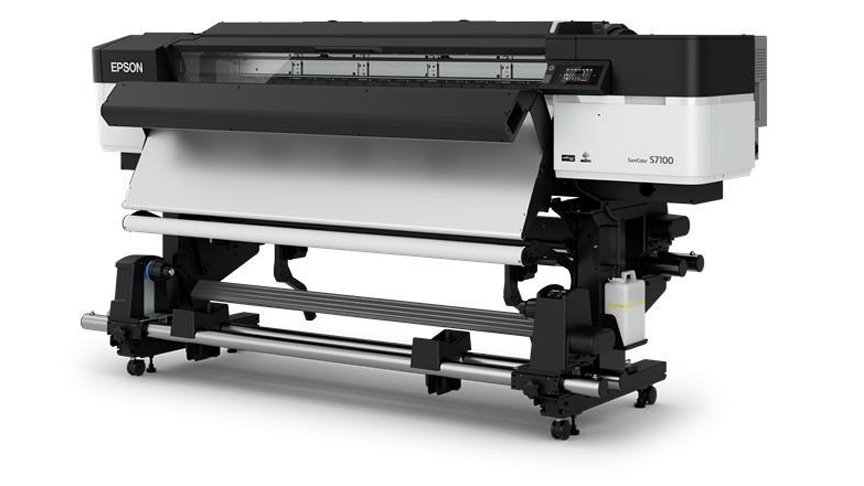
Epson launches SureColor-S7130 as latest addition to acclaimed SC S-Series of eco-solvent printers

With the equipment segment expected to capture more than 75% of the market revenue in Asia Pacific’s commercial printing market, where there’s also a growing demand for short-run and on-demand printing, the SC-S7130 aims to meet evolving needs by empowering businesses to operate more competitively and sustainably.
Published

on

Epson launched the SureColor-S7130 (SC-S7130), the latest addition to its acclaimed SC S-Series of eco-solvent printers. Designed for print service providers specializing in small-volume production, the SC-S7130 combines enhanced productivity, reliability and print quality in a cost effective solution, making it a significant upgrade from its predecessor, the SC-S40670.

With the equipment segment expected to capture more than 75% of the market revenue in Asia Pacific’s commercial printing market, where there’s also a growing demand for short-run and on-demand printing, the SC-S7130 aims to meet evolving needs by empowering businesses to operate more competitively and sustainably.

Engineered for Productivity and Performance

The SC-S7130 features an upgraded PrecisionCore Micro TFP Printhead, delivering close to a 24% increase in print speed in default mode[1]. Equipped with 3,200 nozzles and a wider printhead than its predecessor, the SC-S7130 achieves expanded print width in one pass—improving throughput across all print modes.

To minimize graininess and banding, the nozzles on the SC-S7130 have been specially redesigned to release smaller M-sized dot and larger L-sized dot for high quality print.

Ease of use is a hallmark of the SC-S7130, which features a 4.3-inch touch display for intuitive operation even when wearing gloves. The SC-S7130 also comes with Epson Edge Print Pro, the latest edition of Epson’s advanced image processing and production software that enhances user convenience and remote management during operations. Further, a new ‘Text Sharpness’ mode in Epson Edge Print Pro enables precise and crisp text printing with the SC-S7130.

Printing made Ultra-Reliable

In addition to a newly designed printhead guard that flattens jammed media to prevent damage to the printhead, the carriage temperature sensor is now mounted closer to the nozzle surface for a more accurate reading. The sensor also detects temperature changes quickly, maintaining consistent color reproduction across jobs.

Equipped with a new Nozzle Verification Technology that monitors nozzle performance in real-time, the SC-S7130 is capable of automatically detecting clogged nozzles and triggering an alert so that businesses can act quickly, ensuring print quality is not compromised across jobs.

The SC-S7130 uses Epson UltraChromeTM GS3 inks in 800ml ink packs, replacing the 700ml ink cartridge found in its predecessor, thereby reducing waste and the frequency of ink replacements. Furthermore, the Epson UltraChromeTM GS3 ink technology is GREENGUARD Gold certified for low chemical emissions and volatile organic compounds, making it safe for long-term indoor use.

A Holistic Solution for Diverse Printing Needs

In addition to delivering exceptional performance and enhanced productivity, the SC-S7130 also integrates seamlessly with Epson Cloud Solution PORT, providing businesses with a holistic solution for managing their printing needs. This intuitive, cloud-based remote monitoring software offers real-time insights into printer fleet performance, usage and efficiency, empowering print service providers to make data-driven decisions.

With Epson Cloud Solution PORT, businesses can also seamlessly integrate large printer fleets, monitor printer status, track ink consumption and access operation history remotely, to ensure optimal performance at all times.

“The SC-S7130 is engineered for a wide range of applications, including outdoor and indoor signage, banners and more. Its versatility and reliability, coupled with its cost-effective ownership, make this printer a valuable addition to any print service provider’s lineup,” said Noelle Gonzalez, Head of Marketing and Customer Service at Epson Philippines Corporation. “The SC-S7130 is a testament to Epson’s dedication to creating innovative solutions that empower businesses to remain competitive while meeting their unique needs.”

[1] Printing speed increased 23.8% in default mode using adhesive vinyl in 600 x 1200dpi, 6-pass.

Continue Reading

Tech & Innovation

Acer launches TravelMate X14 AI business laptop to empower SMBs and hybrid workforces

The lineup includes the Acer TravelMate X14 AI Copilot+ PC and three new additions to the eco-friendly Vero projector series: the Acer Vero XL2320p, Vero XL2521, and Vero SL2520n.

Published

on

Acer announced a suite of commercial products designed to empower the modern workforce. The lineup includes the Acer TravelMate X14 AI Copilot+ PC and three new additions to the eco-friendly Vero projector series: the Acer Vero XL2320p, Vero XL2521, and Vero SL2520n.

“As AI is becoming increasingly important in modern business workflows, small and medium businesses need devices that integrate intelligent tools, robust security, and mobility,” said James Lin, General Manager, Notebooks, Acer Inc. “The TravelMate X 14 AI was designed to deliver just that, powered by the latest Intel Core Ultra processors and Copilot+ PC experiences, offering professionals a lightweight yet durable solution crafted to accelerate productivity and collaboration from anywhere.”

“The Acer TravelMate X14 AI demonstrates what’s possible when advanced hardware and modern processors come together. With powerful performance, enhanced security, and unique AI experiences, it’s an ideal choice for today’s professionals looking to upgrade to a PC that prioritizes portability and performance. Together with Acer, we’re redefining what the modern workforce can expect from their Windows 11 PCs.” — Mark Linton, Vice President, Windows + Devices, Microsoft

TravelMate X4 14 AI: Lightweight, Secure, and AI-Ready to Boost SMBs

Built for small and medium businesses (SMBs) and mobile professionals, the TravelMate X4 14 AI (TMX414-51) is a sleek and secure AI business laptop. It features up to an Intel Core Ultra 7 Processor 258V with 115 TOPS[1] of overall performance, up to 32 GB LPDDR5X memory, and up to 1 TB PCIe storage, ensuring smooth multitasking. Running Windows 11 Pro, the laptop supports Copilot+ PC experiences[2], including Recall (preview), Click to Do, improved Windows search, Cocreator in Microsoft Paint, and Live Captions for real-time multilingual translations.

Weighing just 1.27 kg (2.8 lbs) and measuring 15.9 mm (0.63 inches) thin, it is ideal for professionals who travel frequently and work remotely. Built to meet MIL-STD 810H durability standards, it can withstand vibrations, humidity, and extreme temperatures, making it a reliable travel companion. Coupled with its stylish design, the portable AI business laptop can certainly make an impression within any work setup or business meeting.

The 14-inch 16:10 WUXGA display provides ample screen space, with an optional OLED panel with 500 nits peak brightness delivering vibrant colors with TÜV Rheinland Low Blue Light certification[3] (hardware solution) to support better eye comfort. Acer PurifiedView 2.0 and Acer PurifiedVoice 2.0 technology, paired with DTS:X Ultra Audio-enhanced speakers, ensure crystal-clear video calls.

This business laptop complies with TCO certification[4] and includes security features to help protect data and on-screen information. Acer UserSensing 2.0 enables the built-in proximity sensor to dim and then lock the screen when the user is away. Lightning-fast Wi-Fi 7 and Bluetooth 5.4 keep professionals connected for seamless streaming, lag-free video calls, and fast file transfers, and is equipped with two Thunderbolt 4 ports, a USB 3.2 Type-A port, a USB 2.0 Type-A port, an HDMI 2.1 slot and a Gigabit Ethernet port, offering versatile connectivity options.

Acer Vero Projectors

The Acer Vero XL2320p, Vero XL2521, and Vero SL2520n are mercury-free laser projectors made for sustainable and long-term use. With lifespans up to 30,000 hours and 40% lower power consumption compared to traditional lamp-based models, these projectors help reduce the total cost of ownership while delivering reliable performance. As a short-throw projector, the Vero SL2520n can produce a 100-inch image from just 1.1 meters, making it great for space-constrained environments.

All the projectors share the same high-performance specifications, including up to Full HD resolution1 and 4,000 ANSI lumens brightness, projecting crystal clear images with impressive brightness. They support 360-degree projection, portrait mode, and advanced 2D and 4-corner keystone correction, to adapt flexibly to any space or scenario. ​Their IP6X dustproof rating and 24/7 operation capability ensure performance even for demanding use cases, and their 93% Rec.709 color gamut and 50,000:1 contrast ratio deliver immersive images. Viewing experiences are enhanced with 15W built-in speakers and have dedicated modes tailored for entertainment – football mode for the Vero XL2 Series, and golf mode for the Vero SL2520n. The SL2520n comes with its own Ethernet slots, while all three models possess a pair of HDMI ports for flexible display setups.

Staying true to Acer’s eco-conscious values, all three Vero projectors feature 50% post-consumer recycled plastic in their chassis and 100% recyclable packaging, reinforcing their commitment to sustainability.

Pricing and Availability

Exact specifications, prices, and availability will vary by region. To learn more about availability, product specifications and prices in specific markets, please contact your nearest Acer office via www.acer.com.

[1] Specifications may vary depending on the model and/or region. All models are subject to availability. 

[2] Copilot+ PC experiences vary by device and market and may require updates continuing to roll out through 2025; timing varies. See aka.ms/copilotpluspcs 

[3] TÜV Rheinland Low Blue Light (Hardware Solution) certified panel only available on the OLED display SKU. 

[4] Acer TCO-certified models are identified with the “TCO” suffix in the model name (ex: XXXXXX-XX-TCO). For more details on Acer TCO-certified products, please see https://tcocertified.com/product-finder/ 

Continue Reading
Advertisement
Advertisement

Like us on Facebook

Trending